
Planter - Garden Planner
PlanterLifestyle
4.51.24K Reviews
- Version
- 3.6.44
- Installs
- 500.00K
- Age Rating
- Everyone
Screenshots
Our Review of Planter - Garden Planner
 Analysis by Appyee
Hey there, fellow garden enthusiasts! If you’ve ever tried to map out a garden only to end up with a chaotic jungle, then Planter - Garden Planner might just be your new best friend. Let me walk you through my experience with this nifty app, which turned my gardening woes into wins.
Why the First Week Feels So Appealing
My first week with Planter was mostly about turning vague ideas into a layout I could actually judge. A balcony, a narrow bed, or a patch beside the house can feel deceptively large when you are imagining it; once you define the space and place crops, the trade-offs become much clearer. I could compare a tidy row arrangement with a looser mix before committing seeds or time to either one. That early visual feedback is the app’s strongest hook for me.
It is especially useful when you are starting with a blank plot or changing a garden that has become crowded. Rather than relying on memory, I can work through what belongs where and catch obvious spacing conflicts while they are still just a plan. I would treat the layout as a practical sketch, not a guarantee of how plants will grow: real beds have awkward corners, shifting shade, and soil that may not behave like a neat diagram.
A good first session is to enter only the boundaries you know, add the crops you are genuinely considering, and leave uncertain spots open. That keeps planning from becoming a decorating exercise. If I fill every square just because the screen makes it easy, I risk designing a garden that looks productive but leaves no room to reach plants, water them, or harvest without stepping over something.
Getting Started with Planter
First things first, downloading the app was a breeze. Available on both Android and iOS, it’s as simple as a few taps, and voilà, you’re ready to dig in. What struck me initially was the clean and intuitive interface. I mean, I’m no tech whiz, but even I could navigate through it without breaking a sweat.
Mapping Out Your Dream Garden
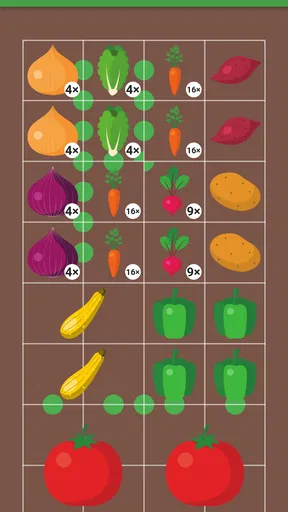
The core feature of Planter - Garden Planner is, of course, its garden plotting capabilities. You start by selecting the dimensions of your garden plot, which is super handy if you’re dealing with limited space like a balcony or a small backyard. The drag-and-drop feature to add plants is as satisfying as it sounds. I found myself lost in planning my garden for hours, laying out rows and clusters of veggies, herbs, and flowers.
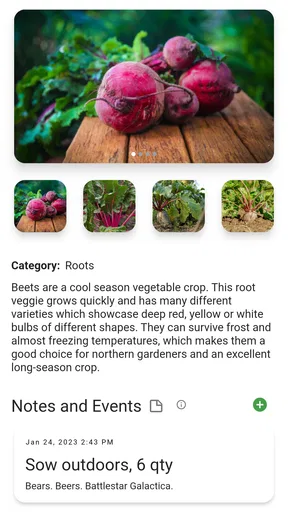
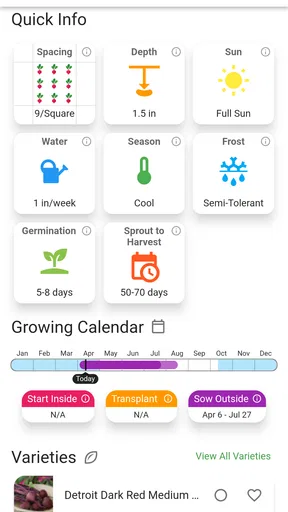
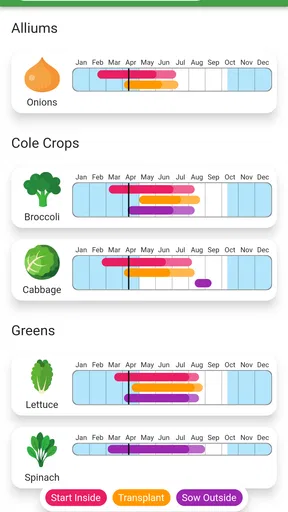
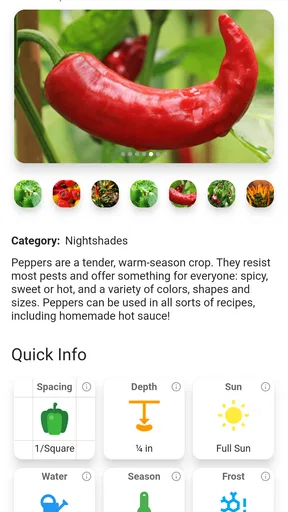
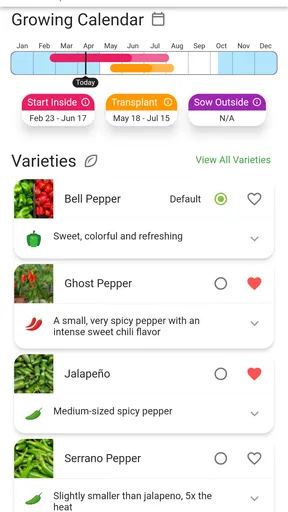
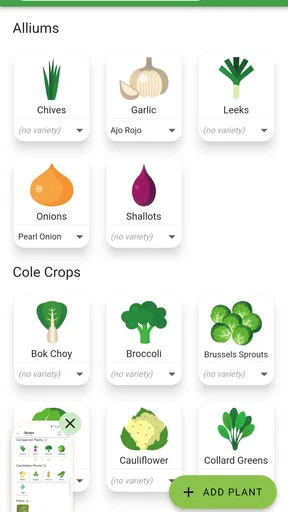
What makes it even cooler is the plant database. You can search for plants by name or category, and each entry provides essential info like planting depth, spacing, and sunlight needs. This is a lifesaver if you tend to mix up your plant requirements like I do. Plus, the app gives you planting reminders based on your local climate, so you’ll never miss the perfect planting window.
From a Garden Sketch to a Useful Plan
The practical value comes from using the plant information alongside the layout rather than treating either as a complete answer on its own. I would check spacing before arranging a bed, then look at sunlight needs before deciding where a taller crop belongs. That simple order can prevent a common planning mistake: fitting plants into a pleasing pattern first and discovering later that their needs conflict.
For a useful routine, I would make a rough plan before a garden-center visit, then revisit it after choosing what I can actually grow. If a seed packet gives instructions that differ from a general reference, I would follow the packet and adjust the drawing. Planting advice depends on the variety and local conditions, so the app is most helpful as a memory aid and planning companion, not as a substitute for checking the instructions for the seeds in hand.
The climate-based reminders can help bring planting decisions back to mind at the right part of the season. I would still treat a reminder as a prompt to check the weather and the condition of the soil, rather than an automatic signal to sow. A cold spell, a wet bed, or an unusually warm stretch can change what makes sense, and a garden plan works best when I leave room for that judgment.
Visualizing Success
One standout feature is the visual representation of your garden. It’s not just dots on a grid; the app provides a detailed view of how your garden will look, complete with plant icons. This visualization helped me see potential overcrowding issues before I even sowed a single seed.
The ability to switch between different views, like a grid or list, adds to the flexibility of planning. Whether you’re a visual planner or prefer detailed lists, Planter has got you covered.
Putting the Plan to Work in Everyday Life
Imagine planning on a quiet evening before a weekend planting session. I can check the available bed space, compare a few crop arrangements, and make a short list of what needs checking outdoors. At the plot, the plan gives me a reference instead of forcing me to remember every decision. If the bed turns out to have less usable space than I thought, I can revise the layout before planting rather than squeezing everything in and regretting it later.
For a shared household garden, a clear plan can also make handoffs easier. One person might choose the vegetables while another handles planting, and a visual arrangement helps both see what was intended. Sharing can invite useful suggestions, though I would keep final decisions grounded in the actual conditions of the garden rather than assuming another person’s successful layout will suit my space too.
That is where Planter differs from the usual alternatives. A paper sketch is flexible and needs no screen, but it does not give the same searchable plant reference in the same place. A notes app can hold reminders and lists, yet it is less natural for seeing how crops fit together. A general gardening guide may explain growing conditions in depth, but it is not necessarily a working map of my own plot. Planter’s appeal is the combination of layout and plant information; if I only need a one-time drawing, paper may be quicker.
Community and Sharing
Another gem of a feature is the community aspect. You can share your garden plans with friends or fellow gardeners, which I found to be a great way to get feedback and tips. Plus, browsing through other users’ gardens gave me loads of inspiration and ideas. It’s like having a gardening community right in your pocket!
Month-to-Month Value and Maintenance
The longer-term value depends less on how exciting the first layout feels and more on whether I return to it as the garden changes. A plan is most useful at decision points: when choosing what to plant, when a crop takes more room than expected, or when I am preparing the next season’s beds. If I keep it reasonably current, it becomes a record of intentions that can guide the next round of choices. If I never reopen it after the initial setup, the novelty fades quickly.
I would keep maintenance deliberately light. After a planting session, update only the changes that matter: a crop moved, a bed left empty, or a variety replaced. There is little value in making the digital plan perfectly match every small adjustment outdoors if doing so becomes a chore. The app should reduce mental clutter, not create a second gardening job. A quick check before buying seeds or starting a new bed is more sustainable than constantly revising every detail.
Planter is a stronger fit for someone who enjoys planning vegetables and wants a visual home for crop arrangements and growing references. It can also help a beginner who is unsure how to turn a small patch into a workable layout. I would be less enthusiastic about recommending it to someone who gardens casually with just a few pots and already remembers what goes where, or to a grower who wants a detailed operational system for every task. In those cases, a simple notebook or a calendar may ask less effort and do enough.
Where the Routine Can Become Friction
The same features that make planning satisfying can also encourage over-planning. It is easy to spend too long adjusting a diagram when the bigger questions are practical: how much time I have to care for the bed, whether I can reach the middle, and whether I actually want to grow every crop I have added. I try to use the layout to answer a real question, then stop once it is good enough to guide the next step.
There is also a difference between information that is useful and information that is decisive. Planting depth, spacing, and sunlight needs help me compare options, but they cannot account for every microclimate or preference. The app should not replace observation: I still need to notice how the light changes, whether a plant is thriving, and what is realistic for my routine. Garden plans are better when they can be revised instead of defended.
The free price makes it easy to try, while in-app purchases range from $0.99 to $99.99 per item, so I would check the purchase details before deciding whether anything beyond the free experience is worthwhile for me. The app is rated for Everyone. Its average rating is 4.6 from around 4,000 ratings, and it has over 500,000 installs, which suggests plenty of gardeners have found a reason to give it a try. Those figures do not tell me whether it suits my own habits, so I would judge it by whether I return to the plan after the first burst of enthusiasm.
My Personal Takeaway
Having used Planter - Garden Planner for a few months now, I can confidently say it’s transformed my approach to gardening. It’s not just about planning; it’s about creating a space that thrives. The app has helped me avoid common gardening mistakes and maximize the potential of my little plot of land.
Whether you’re a seasoned gardener or just starting out, I can’t recommend this app enough. It’s user-friendly, packed with useful features, and genuinely enhances the gardening experience. So, if you’re ready to turn your garden dreams into reality, give Planter - Garden Planner a try. Happy planting!
Does It Earn a Place on My Phone?
For me, the answer depends on the kind of gardening I do. If I am planning a vegetable bed, balancing several crops, or trying to make a small area work harder, I can see a reason to keep Planter around beyond the first week. The layout gives me something concrete to revisit, and the plant reference can help me check a decision without digging through scattered notes. The developer is Planter, and the app’s current version is 3.6.44; it was released on March 19, 2017, and supports operating systems starting at version 7.0.
I would skip it if I wanted a purely automatic gardening coach, a comprehensive journal of every task, or a substitute for learning how my own garden behaves. Its best role is narrower and more practical: planning a vegetable garden and helping me think through where plants belong. Used that way, it can earn lasting space through recurring decisions rather than novelty. If my garden is only a few containers and I rarely change them, I would choose the simplest method I already use. If I keep rearranging beds or forgetting why I chose a particular layout, this app is much easier to justify.
Verdict
Strengths of Planter - Garden Planner
- User-friendly interface simplifies planning.
- Customizable plant database is extensive.
- Visual garden layout boosts creativity.
- Offline mode ensures access anywhere.
- Regular updates add new features.
Limitations of Planter - Garden Planner
- Limited free features require upgrades.
- Some plants missing from database.
- Occasional app crashes reported.
- Design options can feel restrictive.
- No direct planting tips included.
Similar Picks in This Category
View All
SmartThings
Samsung Electronics Co., Ltd.4.6

Google Home
Google LLC4.0

Pinterest4.2

Astrotalk - Talk to Astrologer
Astrology & Horoscope4.7

My Verizon
Verizon Consumer Group4.5

Samsung Wallet (Samsung Pay)
Samsung Electronics Co., Ltd.4.1
Frequently Asked Questions
What features does Planter - Garden Planner offer?
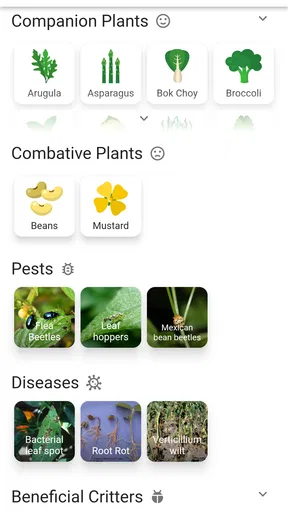
Planter - Garden Planner provides a range of features to help users plan and manage their gardens effectively. It includes tools for layout design, plant information, companion planting guides, and seasonal reminders. Users can easily visualize their garden space, track plant growth, and receive tips tailored to their specific plants and climate.
Is Planter - Garden Planner suitable for beginners?
Yes, Planter - Garden Planner is designed to be user-friendly for both beginners and experienced gardeners. The app offers intuitive tools and resources that guide users through the process of planning and maintaining their garden. With helpful tutorials and a comprehensive plant database, it makes gardening accessible to everyone.
How much does Planter - Garden Planner cost?
Planter - Garden Planner offers both free and premium versions. The free version includes basic features, while the premium version unlocks additional tools and resources for a small subscription fee. This allows users to choose the option that best fits their gardening needs and budget.
Can Planter - Garden Planner be used offline?
Planter - Garden Planner is primarily designed to function with an internet connection for accessing the full range of features, including plant databases and updates. However, some basic features, like garden layout design, can be used offline. Syncing is required when reconnecting to the internet to update and save data.
Does Planter - Garden Planner provide pest management tips?
Yes, Planter - Garden Planner includes a section dedicated to pest management. It offers users advice on identifying common garden pests and provides natural and chemical solutions to manage them. This feature helps gardeners maintain healthy plants by proactively addressing potential pest issues.
